Instructions to use RobinY99/MR-IQA with libraries, inference providers, notebooks, and local apps. Follow these links to get started.
- Libraries
- Transformers
How to use RobinY99/MR-IQA with Transformers:
# Use a pipeline as a high-level helper from transformers import pipeline pipe = pipeline("image-text-to-text", model="RobinY99/MR-IQA") messages = [ { "role": "user", "content": [ {"type": "image", "url": "https://huggingface.co/datasets/huggingface/documentation-images/resolve/main/p-blog/candy.JPG"}, {"type": "text", "text": "What animal is on the candy?"} ] }, ] pipe(text=messages)# Load model directly from transformers import AutoProcessor, AutoModelForMultimodalLM processor = AutoProcessor.from_pretrained("RobinY99/MR-IQA") model = AutoModelForMultimodalLM.from_pretrained("RobinY99/MR-IQA") messages = [ { "role": "user", "content": [ {"type": "image", "url": "https://huggingface.co/datasets/huggingface/documentation-images/resolve/main/p-blog/candy.JPG"}, {"type": "text", "text": "What animal is on the candy?"} ] }, ] inputs = processor.apply_chat_template( messages, add_generation_prompt=True, tokenize=True, return_dict=True, return_tensors="pt", ).to(model.device) outputs = model.generate(**inputs, max_new_tokens=40) print(processor.decode(outputs[0][inputs["input_ids"].shape[-1]:])) - Notebooks
- Google Colab
- Kaggle
- Local Apps Settings
- vLLM
How to use RobinY99/MR-IQA with vLLM:
Install from pip and serve model
# Install vLLM from pip: pip install vllm # Start the vLLM server: vllm serve "RobinY99/MR-IQA" # Call the server using curl (OpenAI-compatible API): curl -X POST "http://localhost:8000/v1/chat/completions" \ -H "Content-Type: application/json" \ --data '{ "model": "RobinY99/MR-IQA", "messages": [ { "role": "user", "content": [ { "type": "text", "text": "Describe this image in one sentence." }, { "type": "image_url", "image_url": { "url": "https://cdn.britannica.com/61/93061-050-99147DCE/Statue-of-Liberty-Island-New-York-Bay.jpg" } } ] } ] }'Use Docker
docker model run hf.co/RobinY99/MR-IQA
- SGLang
How to use RobinY99/MR-IQA with SGLang:
Install from pip and serve model
# Install SGLang from pip: pip install sglang # Start the SGLang server: python3 -m sglang.launch_server \ --model-path "RobinY99/MR-IQA" \ --host 0.0.0.0 \ --port 30000 # Call the server using curl (OpenAI-compatible API): curl -X POST "http://localhost:30000/v1/chat/completions" \ -H "Content-Type: application/json" \ --data '{ "model": "RobinY99/MR-IQA", "messages": [ { "role": "user", "content": [ { "type": "text", "text": "Describe this image in one sentence." }, { "type": "image_url", "image_url": { "url": "https://cdn.britannica.com/61/93061-050-99147DCE/Statue-of-Liberty-Island-New-York-Bay.jpg" } } ] } ] }'Use Docker images
docker run --gpus all \ --shm-size 32g \ -p 30000:30000 \ -v ~/.cache/huggingface:/root/.cache/huggingface \ --env "HF_TOKEN=<secret>" \ --ipc=host \ lmsysorg/sglang:latest \ python3 -m sglang.launch_server \ --model-path "RobinY99/MR-IQA" \ --host 0.0.0.0 \ --port 30000 # Call the server using curl (OpenAI-compatible API): curl -X POST "http://localhost:30000/v1/chat/completions" \ -H "Content-Type: application/json" \ --data '{ "model": "RobinY99/MR-IQA", "messages": [ { "role": "user", "content": [ { "type": "text", "text": "Describe this image in one sentence." }, { "type": "image_url", "image_url": { "url": "https://cdn.britannica.com/61/93061-050-99147DCE/Statue-of-Liberty-Island-New-York-Bay.jpg" } } ] } ] }' - Docker Model Runner
How to use RobinY99/MR-IQA with Docker Model Runner:
docker model run hf.co/RobinY99/MR-IQA
MR-IQA: A Unified Margin View of Regression and Ranking for Blind Image Quality Assessment
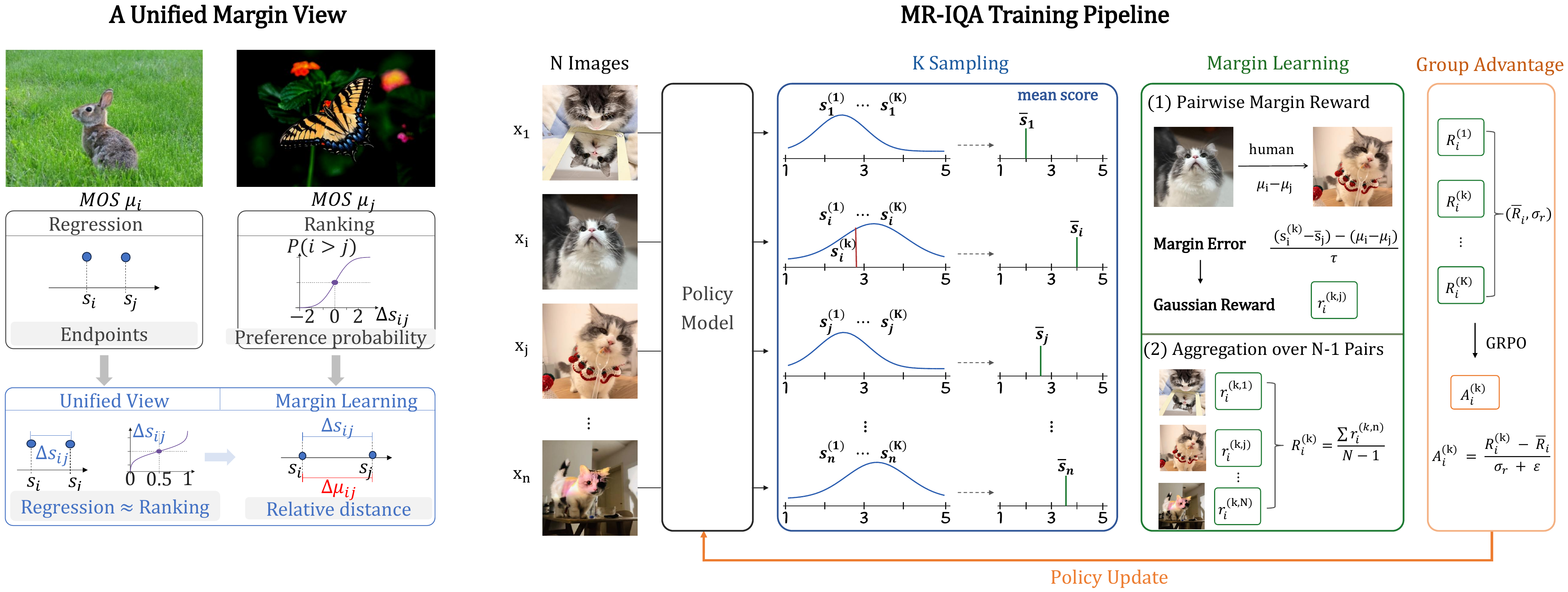
We derive that regression and ranking are approximately equivalent under a unified margin view. Based on this observation, we propose MR-IQA for margin learning in blind image quality assessment.
Validation Snapshot
The released checkpoint was validated after each epoch with an 8-shard setup on a held-out KONIQ split.
| Epoch | Valid samples | SRCC | PLCC | Shards |
|---|---|---|---|---|
| 1 | 200 | 0.8840 | 0.8894 | 8 |
| 2 | 200 | 0.9213 | 0.9302 | 8 |
| 3 | 200 | 0.9318 | 0.9392 | 8 |
| 4 | 200 | 0.9274 | 0.9340 | 8 |
| 5 | 200 | 0.9271 | 0.9409 | 8 |
| 6 | 200 | 0.9249 | 0.9406 | 8 |
| 7 | 200 | 0.9205 | 0.9408 | 8 |
| 8 | 200 | 0.9288 | 0.9465 | 8 |
| 9 | 200 | 0.9307 | 0.9450 | 8 |
| 10 | 200 | 0.9251 | 0.9421 | 8 |
Best SRCC was reached at epoch 3. The final released checkpoint corresponds to epoch 10. Sanitized training metadata is available in training_guidance/.
Quick Start
Load the model with a standard Transformers vision-language workflow. Provide one image and ask for an overall perceptual quality score in the 1 to 5 range. For easiest downstream parsing, request the final numeric score inside <answer>...</answer>.
Recommended prompt:
Assess the overall perceptual quality of this image. Briefly explain your assessment, then output a final quality score as a float between 1 and 5, rounded to two decimal places, inside
<answer>...</answer>.
Output Format
A typical response contains a short assessment followed by a final score:
The image has generally clear structure and acceptable perceptual quality, with some visible degradation in fine detail.
<answer>3.74</answer>
Citation
Citation information will be added with the accompanying paper release.
- Downloads last month
- -