

Instructions to use QuantFactory/Qwen2.5-Math-7B-Instruct-GGUF with libraries, inference providers, notebooks, and local apps. Follow these links to get started.
- Libraries
- Transformers
How to use QuantFactory/Qwen2.5-Math-7B-Instruct-GGUF with Transformers:
# Use a pipeline as a high-level helper from transformers import pipeline pipe = pipeline("text-generation", model="QuantFactory/Qwen2.5-Math-7B-Instruct-GGUF") messages = [ {"role": "user", "content": "Who are you?"}, ] pipe(messages)# Load model directly from transformers import AutoModel model = AutoModel.from_pretrained("QuantFactory/Qwen2.5-Math-7B-Instruct-GGUF", dtype="auto") - llama-cpp-python
How to use QuantFactory/Qwen2.5-Math-7B-Instruct-GGUF with llama-cpp-python:
# !pip install llama-cpp-python from llama_cpp import Llama llm = Llama.from_pretrained( repo_id="QuantFactory/Qwen2.5-Math-7B-Instruct-GGUF", filename="Qwen2.5-Math-7B-Instruct.Q2_K.gguf", )
llm.create_chat_completion( messages = [ { "role": "user", "content": "What is the capital of France?" } ] ) - Notebooks
- Google Colab
- Kaggle
- Local Apps
- llama.cpp
How to use QuantFactory/Qwen2.5-Math-7B-Instruct-GGUF with llama.cpp:
Install from brew
brew install llama.cpp # Start a local OpenAI-compatible server with a web UI: llama-server -hf QuantFactory/Qwen2.5-Math-7B-Instruct-GGUF:Q4_K_M # Run inference directly in the terminal: llama-cli -hf QuantFactory/Qwen2.5-Math-7B-Instruct-GGUF:Q4_K_M
Install from WinGet (Windows)
winget install llama.cpp # Start a local OpenAI-compatible server with a web UI: llama-server -hf QuantFactory/Qwen2.5-Math-7B-Instruct-GGUF:Q4_K_M # Run inference directly in the terminal: llama-cli -hf QuantFactory/Qwen2.5-Math-7B-Instruct-GGUF:Q4_K_M
Use pre-built binary
# Download pre-built binary from: # https://github.com/ggerganov/llama.cpp/releases # Start a local OpenAI-compatible server with a web UI: ./llama-server -hf QuantFactory/Qwen2.5-Math-7B-Instruct-GGUF:Q4_K_M # Run inference directly in the terminal: ./llama-cli -hf QuantFactory/Qwen2.5-Math-7B-Instruct-GGUF:Q4_K_M
Build from source code
git clone https://github.com/ggerganov/llama.cpp.git cd llama.cpp cmake -B build cmake --build build -j --target llama-server llama-cli # Start a local OpenAI-compatible server with a web UI: ./build/bin/llama-server -hf QuantFactory/Qwen2.5-Math-7B-Instruct-GGUF:Q4_K_M # Run inference directly in the terminal: ./build/bin/llama-cli -hf QuantFactory/Qwen2.5-Math-7B-Instruct-GGUF:Q4_K_M
Use Docker
docker model run hf.co/QuantFactory/Qwen2.5-Math-7B-Instruct-GGUF:Q4_K_M
- LM Studio
- Jan
- vLLM
How to use QuantFactory/Qwen2.5-Math-7B-Instruct-GGUF with vLLM:
Install from pip and serve model
# Install vLLM from pip: pip install vllm # Start the vLLM server: vllm serve "QuantFactory/Qwen2.5-Math-7B-Instruct-GGUF" # Call the server using curl (OpenAI-compatible API): curl -X POST "http://localhost:8000/v1/chat/completions" \ -H "Content-Type: application/json" \ --data '{ "model": "QuantFactory/Qwen2.5-Math-7B-Instruct-GGUF", "messages": [ { "role": "user", "content": "What is the capital of France?" } ] }'Use Docker
docker model run hf.co/QuantFactory/Qwen2.5-Math-7B-Instruct-GGUF:Q4_K_M
- SGLang
How to use QuantFactory/Qwen2.5-Math-7B-Instruct-GGUF with SGLang:
Install from pip and serve model
# Install SGLang from pip: pip install sglang # Start the SGLang server: python3 -m sglang.launch_server \ --model-path "QuantFactory/Qwen2.5-Math-7B-Instruct-GGUF" \ --host 0.0.0.0 \ --port 30000 # Call the server using curl (OpenAI-compatible API): curl -X POST "http://localhost:30000/v1/chat/completions" \ -H "Content-Type: application/json" \ --data '{ "model": "QuantFactory/Qwen2.5-Math-7B-Instruct-GGUF", "messages": [ { "role": "user", "content": "What is the capital of France?" } ] }'Use Docker images
docker run --gpus all \ --shm-size 32g \ -p 30000:30000 \ -v ~/.cache/huggingface:/root/.cache/huggingface \ --env "HF_TOKEN=<secret>" \ --ipc=host \ lmsysorg/sglang:latest \ python3 -m sglang.launch_server \ --model-path "QuantFactory/Qwen2.5-Math-7B-Instruct-GGUF" \ --host 0.0.0.0 \ --port 30000 # Call the server using curl (OpenAI-compatible API): curl -X POST "http://localhost:30000/v1/chat/completions" \ -H "Content-Type: application/json" \ --data '{ "model": "QuantFactory/Qwen2.5-Math-7B-Instruct-GGUF", "messages": [ { "role": "user", "content": "What is the capital of France?" } ] }' - Ollama
How to use QuantFactory/Qwen2.5-Math-7B-Instruct-GGUF with Ollama:
ollama run hf.co/QuantFactory/Qwen2.5-Math-7B-Instruct-GGUF:Q4_K_M
- Unsloth Studio new
How to use QuantFactory/Qwen2.5-Math-7B-Instruct-GGUF with Unsloth Studio:
Install Unsloth Studio (macOS, Linux, WSL)
curl -fsSL https://unsloth.ai/install.sh | sh # Run unsloth studio unsloth studio -H 0.0.0.0 -p 8888 # Then open http://localhost:8888 in your browser # Search for QuantFactory/Qwen2.5-Math-7B-Instruct-GGUF to start chatting
Install Unsloth Studio (Windows)
irm https://unsloth.ai/install.ps1 | iex # Run unsloth studio unsloth studio -H 0.0.0.0 -p 8888 # Then open http://localhost:8888 in your browser # Search for QuantFactory/Qwen2.5-Math-7B-Instruct-GGUF to start chatting
Using HuggingFace Spaces for Unsloth
# No setup required # Open https://huggingface.co/spaces/unsloth/studio in your browser # Search for QuantFactory/Qwen2.5-Math-7B-Instruct-GGUF to start chatting
- Pi new
How to use QuantFactory/Qwen2.5-Math-7B-Instruct-GGUF with Pi:
Start the llama.cpp server
# Install llama.cpp: brew install llama.cpp # Start a local OpenAI-compatible server: llama-server -hf QuantFactory/Qwen2.5-Math-7B-Instruct-GGUF:Q4_K_M
Configure the model in Pi
# Install Pi: npm install -g @mariozechner/pi-coding-agent # Add to ~/.pi/agent/models.json: { "providers": { "llama-cpp": { "baseUrl": "http://localhost:8080/v1", "api": "openai-completions", "apiKey": "none", "models": [ { "id": "QuantFactory/Qwen2.5-Math-7B-Instruct-GGUF:Q4_K_M" } ] } } }Run Pi
# Start Pi in your project directory: pi
- Hermes Agent new
How to use QuantFactory/Qwen2.5-Math-7B-Instruct-GGUF with Hermes Agent:
Start the llama.cpp server
# Install llama.cpp: brew install llama.cpp # Start a local OpenAI-compatible server: llama-server -hf QuantFactory/Qwen2.5-Math-7B-Instruct-GGUF:Q4_K_M
Configure Hermes
# Install Hermes: curl -fsSL https://hermes-agent.nousresearch.com/install.sh | bash hermes setup # Point Hermes at the local server: hermes config set model.provider custom hermes config set model.base_url http://127.0.0.1:8080/v1 hermes config set model.default QuantFactory/Qwen2.5-Math-7B-Instruct-GGUF:Q4_K_M
Run Hermes
hermes
- Docker Model Runner
How to use QuantFactory/Qwen2.5-Math-7B-Instruct-GGUF with Docker Model Runner:
docker model run hf.co/QuantFactory/Qwen2.5-Math-7B-Instruct-GGUF:Q4_K_M
- Lemonade
How to use QuantFactory/Qwen2.5-Math-7B-Instruct-GGUF with Lemonade:
Pull the model
# Download Lemonade from https://lemonade-server.ai/ lemonade pull QuantFactory/Qwen2.5-Math-7B-Instruct-GGUF:Q4_K_M
Run and chat with the model
lemonade run user.Qwen2.5-Math-7B-Instruct-GGUF-Q4_K_M
List all available models
lemonade list
llm.create_chat_completion(
messages = [
{
"role": "user",
"content": "What is the capital of France?"
}
]
)QuantFactory/Qwen2.5-Math-7B-Instruct-GGUF
This is quantized version of Qwen/Qwen2.5-Math-7B-Instruct created using llama.cpp
Original Model Card
Qwen2.5-Math-7B-Instruct
🚨 Qwen2.5-Math mainly supports solving English and Chinese math problems through CoT and TIR. We do not recommend using this series of models for other tasks.
Introduction
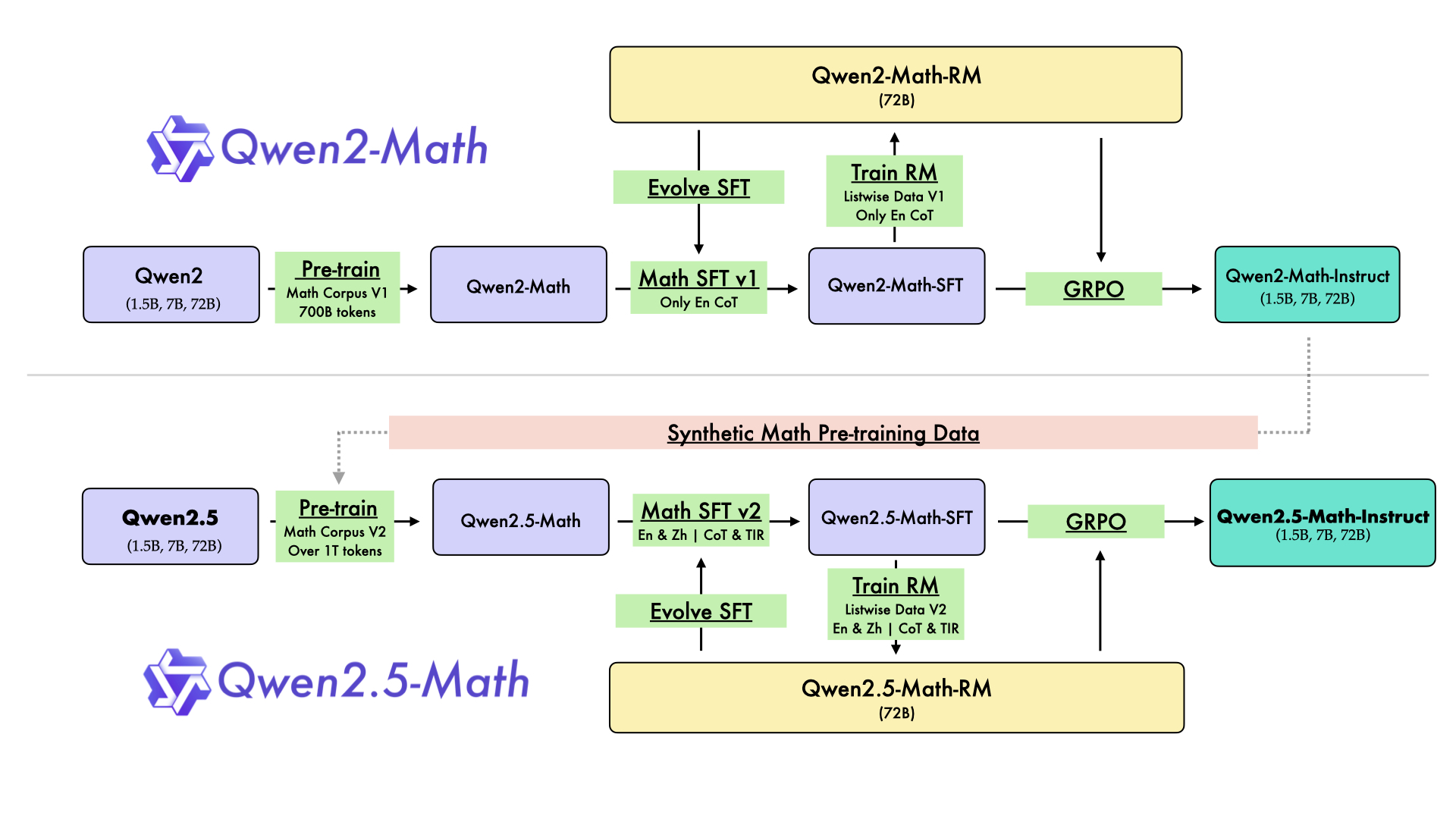
In August 2024, we released the first series of mathematical LLMs - Qwen2-Math - of our Qwen family. A month later, we have upgraded it and open-sourced Qwen2.5-Math series, including base models Qwen2.5-Math-1.5B/7B/72B, instruction-tuned models Qwen2.5-Math-1.5B/7B/72B-Instruct, and mathematical reward model Qwen2.5-Math-RM-72B.
Unlike Qwen2-Math series which only supports using Chain-of-Thught (CoT) to solve English math problems, Qwen2.5-Math series is expanded to support using both CoT and Tool-integrated Reasoning (TIR) to solve math problems in both Chinese and English. The Qwen2.5-Math series models have achieved significant performance improvements compared to the Qwen2-Math series models on the Chinese and English mathematics benchmarks with CoT.
While CoT plays a vital role in enhancing the reasoning capabilities of LLMs, it faces challenges in achieving computational accuracy and handling complex mathematical or algorithmic reasoning tasks, such as finding the roots of a quadratic equation or computing the eigenvalues of a matrix. TIR can further improve the model's proficiency in precise computation, symbolic manipulation, and algorithmic manipulation. Qwen2.5-Math-1.5B/7B/72B-Instruct achieve 79.7, 85.3, and 87.8 respectively on the MATH benchmark using TIR.
Model Details
For more details, please refer to our blog post and GitHub repo.
Requirements
transformers>=4.37.0for Qwen2.5-Math models. The latest version is recommended.
🚨 This is a must becausetransformersintegrated Qwen2 codes since4.37.0.
For requirements on GPU memory and the respective throughput, see similar results of Qwen2 here.
Quick Start
Qwen2.5-Math-7B-Instruct is an instruction model for chatting;
Qwen2.5-Math-7B is a base model typically used for completion and few-shot inference, serving as a better starting point for fine-tuning.
🤗 Hugging Face Transformers
Qwen2.5-Math can be deployed and infered in the same way as Qwen2.5. Here we show a code snippet to show you how to use the chat model with transformers:
from transformers import AutoModelForCausalLM, AutoTokenizer
model_name = "Qwen/Qwen2.5-Math-7B-Instruct"
device = "cuda" # the device to load the model onto
model = AutoModelForCausalLM.from_pretrained(
model_name,
torch_dtype="auto",
device_map="auto"
)
tokenizer = AutoTokenizer.from_pretrained(model_name)
prompt = "Find the value of $x$ that satisfies the equation $4x+5 = 6x+7$."
# CoT
messages = [
{"role": "system", "content": "Please reason step by step, and put your final answer within \\boxed{}."},
{"role": "user", "content": prompt}
]
# TIR
messages = [
{"role": "system", "content": "Please integrate natural language reasoning with programs to solve the problem above, and put your final answer within \\boxed{}."},
{"role": "user", "content": prompt}
]
text = tokenizer.apply_chat_template(
messages,
tokenize=False,
add_generation_prompt=True
)
model_inputs = tokenizer([text], return_tensors="pt").to(device)
generated_ids = model.generate(
**model_inputs,
max_new_tokens=512
)
generated_ids = [
output_ids[len(input_ids):] for input_ids, output_ids in zip(model_inputs.input_ids, generated_ids)
]
response = tokenizer.batch_decode(generated_ids, skip_special_tokens=True)[0]
Citation
If you find our work helpful, feel free to give us a citation.
@article{yang2024qwen2,
title={Qwen2 technical report},
author={Yang, An and Yang, Baosong and Hui, Binyuan and Zheng, Bo and Yu, Bowen and Zhou, Chang and Li, Chengpeng and Li, Chengyuan and Liu, Dayiheng and Huang, Fei and others},
journal={arXiv preprint arXiv:2407.10671},
year={2024}
}
- Downloads last month
- 647
2-bit
3-bit
4-bit
5-bit
6-bit
8-bit

# !pip install llama-cpp-python from llama_cpp import Llama llm = Llama.from_pretrained( repo_id="QuantFactory/Qwen2.5-Math-7B-Instruct-GGUF", filename="", )